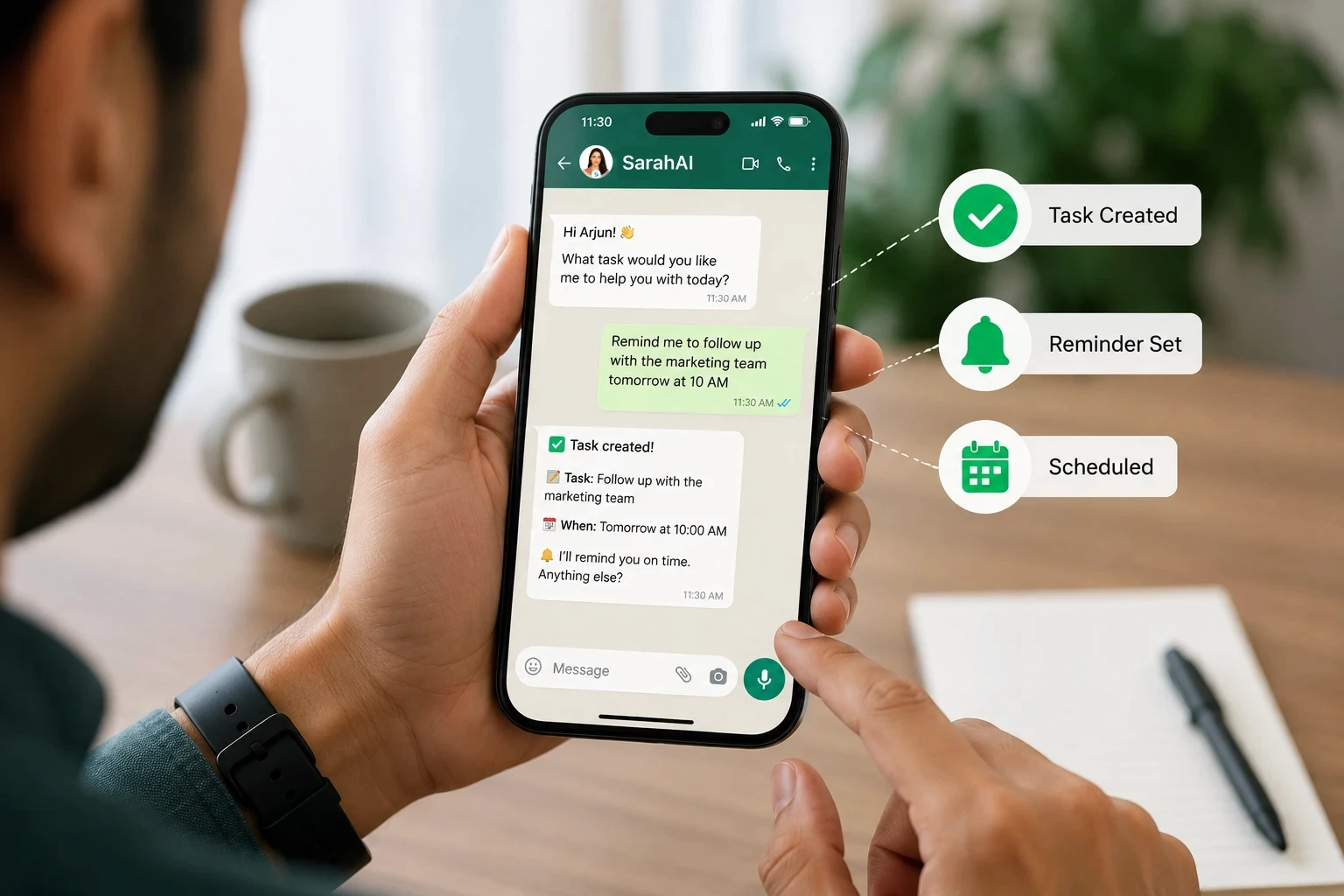
How to Manage Tasks From WhatsApp Without Another App
AI Strategy
8 Min
|

Copied


Quick Summary
The To-Do List You Already Have Open
Open your phone right now and look at your home screen. There is a good chance you have at least one task management app sitting there - downloaded with intention, used for about two weeks, and now mostly ignored.
Meanwhile, the app you actually open 40, 50, 60 times a day is the same one it always is. WhatsApp.
This is not a discipline problem. It is a design problem. Every dedicated task management app asks you to do the same thing: stop what you are doing, open a different interface, and manually enter a task into a system that lives nowhere near the conversation where the task was actually created.
Most tasks are not born in a task app. They are born in a conversation. A client says they need something by Friday. A colleague asks you to follow up on a quote. A supplier confirms a delivery date. All of that happens on WhatsApp - and then, if you are using a separate task app, you have to manually transfer it somewhere else, hoping you remember to do it before the thought disappears.
There is a simpler way. You do not need another app. You need WhatsApp to do more of what it is already doing - with some intelligence added underneath.
Why Task Management Apps Get Abandoned
This is not a niche pattern. It happens to almost everyone who tries a new productivity tool, and it happens for the same three reasons every time.
The task is created somewhere else
The conversation that creates the task - a client request, a team discussion, a supplier confirmation - almost always happens on WhatsApp. The task management app is a second destination you have to remember to visit. Every task that gets created requires you to leave the place where the information arrived and re-enter it somewhere else.
The reminder requires you to check, not the other way around
Most task apps are passive. They wait for you to open them. If you do not open the app, the reminder might as well not exist. A notification badge on an app icon is easy to ignore - especially when you have twelve other app icons doing the same thing.
Team adoption never sticks
Getting yourself to use a new app consistently is hard enough. Getting an entire team to log in, check notifications, and update task statuses in a tool they did not choose is significantly harder - especially for small teams without a dedicated operations function enforcing it.

What WhatsApp Task Management Actually Means
WhatsApp automation for task management is not about turning WhatsApp into a clunky to-do list app. It means using AI to understand a normal message or voice note, and converting it into a structured task - with no separate data entry step.
Here is the practical difference. With a traditional task management app, creating a task looks like: open app, tap new task, type the title, select a due date from a calendar widget, assign it to someone from a dropdown, save.
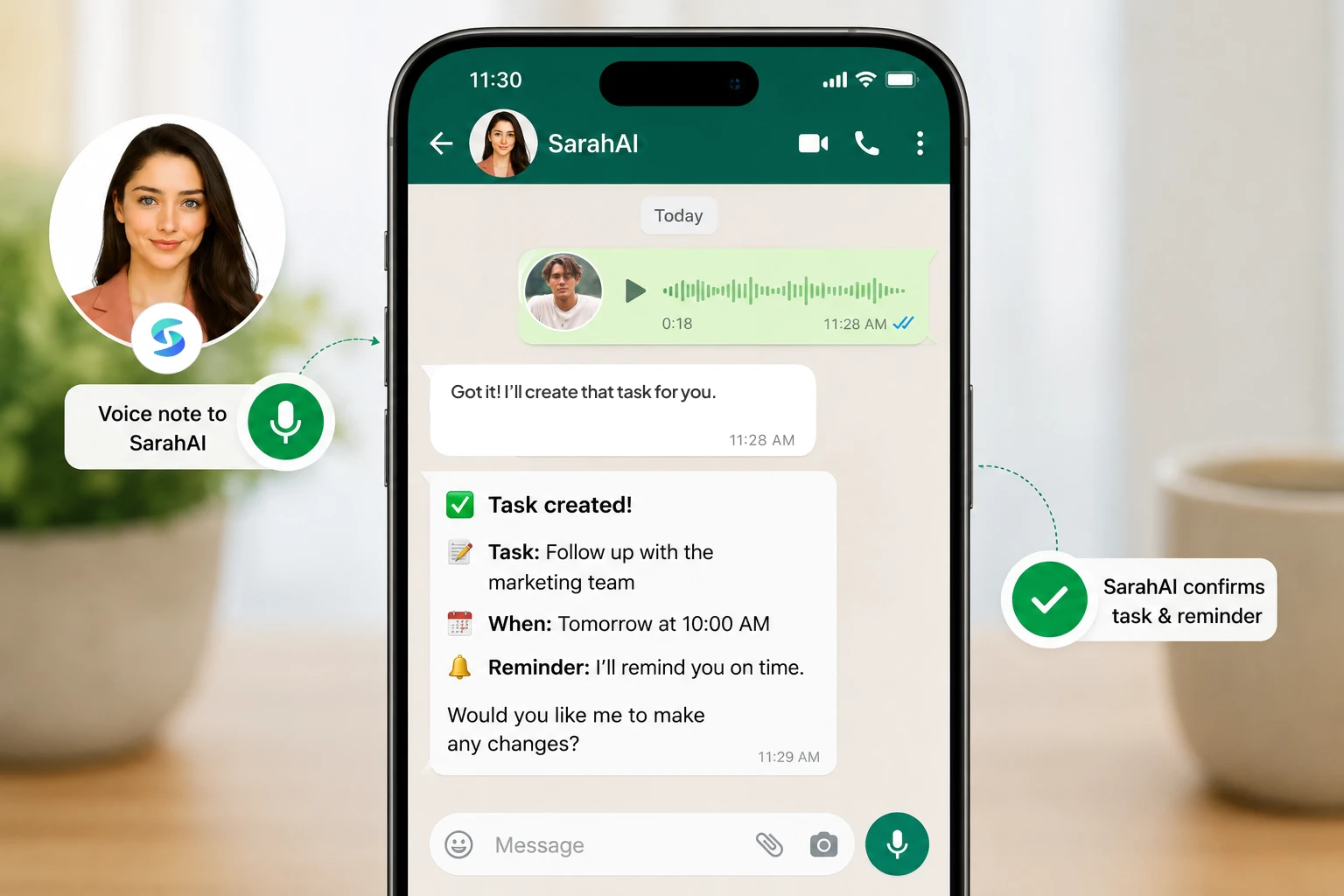
With WhatsApp task management powered by AI, it looks like: send a voice note saying what needs to happen and by when. That is the entire process.
1 | You send a message or voice note “Remind me to follow up with Priya about the contract on Friday.” Typed or spoken - exactly how you would naturally phrase it to a colleague. |
2 | The AI understands the intent It extracts the action (follow up), the person (Priya), the subject (the contract), and the deadline (Friday) - without you filling out a single form field. |
3 | The task is created and confirmed You get a confirmation message in the same WhatsApp thread: task created, reminder scheduled for Friday. No app switch. No login. |
4 | The reminder reaches you proactively On Friday, the reminder arrives in WhatsApp - the channel you are already watching - rather than waiting in an app you have to remember to open. |
→ Related read: Turn Voice Notes into Tasks: A Guide for Busy Entrepreneurs
See It in Action
Reading about voice-to-task automation is one thing. Watching it happen in a real WhatsApp thread, in real time, makes the point faster than any explanation can.
This is the exact workflow SarahAI users rely on every day - sending a voice note or text, and watching it become a tracked task, reminder, or calendar event without lifting a finger beyond the message itself.
Notice what does not happen in that demo. No app download screen. No login. No form to fill in. The entire interaction takes place inside the WhatsApp thread that was already open.
→ Watch more product walkthroughs on the SarahAI YouTube channel
Everything You Can Manage Without Leaving WhatsApp
Task creation is the obvious starting point, but it is not the whole picture. Here is the full range of what a WhatsApp-native AI assistant can handle - all from the same thread you already check all day.
Personal and delegated tasks
Create a task for yourself, or assign one directly to a team member. The assignee receives it in their own WhatsApp thread. No one needs to be invited to a workspace or log into anything new.
Smart reminders
Set a reminder by simply describing it. “Remind me to call the supplier tomorrow at 11am” becomes a scheduled WhatsApp reminder, delivered exactly when needed - not buried in an app notification you might dismiss without reading.
Meeting scheduling
“Schedule a call with the design team Tuesday at 3pm” creates the calendar event, sends the invite, and confirms it back in WhatsApp. No switching to a separate calendar app to check availability or add the event manually.
Automatic follow-up tracking
This is where WhatsApp task management goes beyond what most dedicated apps do well. Tasks that are overdue get surfaced automatically. Follow-ups that were agreed in conversation get tracked without a second reminder being set. The system actively manages what is pending - rather than passively storing it.
Daily and weekly summaries
Instead of opening a dashboard to see what is outstanding, a structured summary - today's meetings, pending tasks, overdue items, priority emails - arrives directly in WhatsApp, automatically, without anyone requesting it.
A Task Management App vs. WhatsApp With AI Built In
Same task. Two different paths to getting it tracked.
A Task Management App | SarahAI on WhatsApp |
Client mentions a deadline in a WhatsApp message. You manually note it, then open a separate task app to log it. | Client mentions a deadline in WhatsApp. You forward or voice-note it to SarahAI. Task created in the same thread, no app switch. |
You receive a push notification from the task app reminding you to check your tasks. You dismiss it and forget. | The reminder arrives as a WhatsApp message at the scheduled time - in the channel you are already reading all day. |
You want to delegate a task to a teammate. They need to be invited to the workspace and create an account first. | You assign the task via WhatsApp. It lands in their own WhatsApp thread instantly. No invite, no account creation. |
At the end of the week, you log into the dashboard to see what is overdue and what is pending. | A weekly summary arrives automatically in WhatsApp - overdue tasks, pending items, and what is coming up next. |
Three weeks in, you have stopped opening the app. Tasks created in WhatsApp never make it into the system. | Three months in, nothing has changed about your behaviour. You are still just using WhatsApp - it just does more now. |
When a Dedicated Task App Still Makes Sense
This is not an absolute argument. There are real situations where a structured, dashboard-first task management app is the better tool.
Large teams (20+) coordinating complex, interdependent projects with formal sprint planning
Workflows that require Gantt charts, dependency mapping, or detailed resource allocation views
Organisations with a dedicated operations or PMO function that enforces tool adoption and reporting
Heavy integration needs with engineering tools like Jira, GitHub, or detailed sprint tracking
For most SME founders and small teams, none of these conditions apply. The actual daily need is simpler: create a task quickly, get reminded reliably, delegate without friction, and see what is outstanding without opening a dashboard. That is precisely the layer WhatsApp-native AI is built for.
How SarahAI Makes This Work
SarahAI is the AI executive assistant built to operate natively inside WhatsApp - not alongside it, not as a notification relay, but as the actual interface for getting things done.
Voice or text - whichever is faster for you
Type a task or speak it as a voice note. SarahAI processes both equally well, and understands natural phrasing rather than requiring rigid commands or specific keywords.
Confirms every action, every time
Nothing happens silently. Every task created, reminder set, or meeting scheduled is confirmed back to you in the same thread - so you always know what SarahAI understood and acted on.
Asks for missing details instead of guessing
If you say “remind me about the proposal” without a date, SarahAI asks for the missing detail rather than creating an incomplete or incorrect task.
Works for delegation, not just personal tasks
Assign a task to a team member directly from WhatsApp. They receive it in their own thread - no invite link, no account setup, no separate login.
Surfaces what is overdue, automatically
Tasks that are not completed by their deadline get flagged - in your daily brief, not buried in a list you have to remember to scroll through.
→ See SarahAI's full feature set: thesarahai.com/#features
→ SarahAI pricing: thesarahai.com/#pricing
→ Related read: WhatsApp-Based AI Assistant vs a Dedicated AI Assistant App
The Shift This Represents
There is a quiet but real change happening in how small businesses handle operations. It is not about adopting more software. It is about making the software you already use - and already trust - do more.
WhatsApp was never designed to be a task management tool. But for millions of founders and teams, it has become the de facto operating layer of the business anyway. Adding AI on top of that reality, instead of fighting it with another app, is simply meeting people where they already are.
The result is not a new habit to build. It is the same habit you already have - just with more happening underneath it.
More from SarahAI
Continue reading from the Product & How-To Series:
Frequently Asked Questions
Can I manage tasks directly from WhatsApp without a separate app?
Yes. With an AI assistant like SarahAI built natively into WhatsApp, you can create tasks, set reminders, assign work to team members, and track follow-ups entirely within a WhatsApp conversation. No separate task management app or login is required.
How do WhatsApp reminders work with an AI assistant?
You send a voice note or text message describing the task and when it is due - for example, ‘remind me to send the invoice on Friday.’ The AI assistant understands the request, creates a structured reminder, confirms it back in the same thread, and sends the reminder via WhatsApp at the scheduled time.
What is WhatsApp automation for task management?
WhatsApp automation for task management means using AI to automatically convert messages or voice notes into structured tasks, reminders, and follow-ups - without manual data entry. SarahAI automates this entire process, including delegating tasks to team members and sending automatic follow-up reminders for overdue items.
Is a WhatsApp-based task manager as powerful as a dedicated task management app?
For day-to-day task creation, reminders, and follow-ups, a WhatsApp-native AI assistant like SarahAI is often more effective because there is no adoption friction - you and your team are already using WhatsApp. Dedicated task management apps offer stronger dashboard views for complex, large-team project management, but most SME founders never reach that scale of need.
Can I delegate tasks to my team through WhatsApp?
Yes. SarahAI allows you to delegate tasks to team members directly from WhatsApp. The assignee receives the task in their own WhatsApp thread, can update its status, and you can track progress without anyone needing to open a separate application.