How to Automate Client Follow-Ups Without Chasing
AI Strategy
12 Min
|

Copied


Quick Summary
Why Follow-Ups Actually Fail
Ask most business owners why a follow-up was missed and you get a version of "things were busy". That is true and it is not the cause.
The cause is almost always further upstream. Around 70% of decisions made in a meeting are forgotten within 24 hours when nobody writes them down. The follow-up did not fall out of a system - it never entered one.
Source: Laxis 2026, via Archie - Meeting Statistics
Once you see it that way, the usual advice stops making sense. Buying an email sequencer to fix a capture problem is like buying a faster printer because you keep forgetting to write the letter.
There are three root causes, in order of how often they are the real one.
It was never captured. Agreed verbally at 4:45pm, remembered until roughly 6pm, gone by Thursday. No system knows it exists.
It was captured but had no trigger. It sits in a notes app or a transcript. Nothing will ever surface it at the right moment.
It had a trigger but no cadence. You followed up once, got nothing back, and stopped - which is where most deals quietly die.
This guide builds a system that closes all three, and is explicit about the parts that should stay human.
70%of meeting decisions are forgotten within 24 hours without notes (Laxis, 2026) | 43%of professionals lose 3+ hours a week to scheduling and rescheduling (Calendly) | 5 typesof follow-up - sales, delivery, payment, post-project and dormant - each needing a different system |
Source: Laxis and Calendly research, via Archie and Speakwise, 2026
The Five Types of Follow-Up
Most follow-up systems fail because they try to treat all of these the same way. They have different urgency, different tone and different acceptable levels of automation.
💼 1. Sales follow-up - after a pitch or proposalHighest commercial value, most frequently abandoned. The first follow-up usually happens; the third and fourth rarely do, which is exactly where most closes come from. Partial automation works well here because the messages are somewhat standard. Automate: yes, with human review before each send. |
🛠️ 2. Delivery follow-up - chasing what you need from the clientAssets, approvals, content, access. The most damaging to leave, because your delivery timeline is blocked while the client believes everything is fine. Needs a clear escalation path, not just repetition. Automate: the reminder and the escalation trigger. Keep the message human. |
💰 3. Payment follow-up - chasing an invoiceThe one people delay most, because it feels confrontational. Ironically the most safely automatable, since a polite systematic reminder is less awkward than a personal one and clients expect it. Automate: fully, for the first two reminders. |
🌟 4. Post-project follow-up - feedback, testimonial, referralAlmost universally skipped, and the cheapest revenue available. The window is short: within two weeks of delivery, while the result still feels recent. Automate: the trigger and the timing. Personalise the message. |
🕊️ 5. Dormant client follow-up - re-engaging someone who went quietNeeds judgement more than any other type. A templated "just checking in" to a client who went quiet for a real reason does active damage. Automate: the reminder to look at the list. Nothing else. |

The Five-Stage System
Stage 1: Capture - the stage everyone skips
Nothing downstream works without this. The rule is simple and non-negotiable: the commitment must be recorded before you do anything else, including getting into your car.
The practical problem is that the moment a call ends is the worst possible moment to open a CRM. You are walking, driving, or already late for the next thing. Any capture method requiring a laptop will be skipped, and after two weeks of skipping it, abandoned.
So the capture method has to survive being used badly. Voice is the only input that reliably does, because it takes eight seconds and no hands.
Good capture: a voice note the second the call ends, in whatever language you were just speaking
Acceptable capture: a meeting transcription tool that extracts action items automatically
Poor capture: a notes app, because nothing will ever surface it again
No capture: intending to update the CRM tonight
Test for this stage: if someone asked you right now for every commitment you made this week, could you answer without thinking? If not, this is your bottleneck and no sequencing tool will fix it.
Stage 2: Trigger - when it should come back to you
A captured commitment with no date is a note. A captured commitment with a date is a follow-up.
Attach a specific date at capture, not later. "Follow up next week" is not a trigger; "Thursday 10am" is. When the client did not give you a date, pick one anyway - an arbitrary date you can move beats an open loop you forget.
The trigger should arrive where you will act on it. A calendar notification on a laptop you are not near is not a trigger.
Stage 3: Template - so writing it is not a decision
Most follow-ups get delayed not because you forgot, but because writing the message requires a small amount of thought, and small amounts of thought lose to a full inbox.
Four templates cover roughly 80% of cases. Write them once, keep them short, and personalise the first line only. Scripts are further down this guide.
Stage 4: Cadence - the part almost everyone stops too early
One follow-up is not a cadence. A cadence is a planned sequence with defined spacing, and an end.
The most common failure is stopping after the second attempt, which is usually before the client has had a genuine chance to respond. The second most common failure is having no end, so a prospect gets chased for four months and the relationship sours.
Stage 5: Escalation - changing the channel, or closing the loop
If the cadence completes without a response, something has to change: a different channel, a different person, or an explicit close-out message that leaves the door open.
The close-out is the most underused message in business. "I will assume the timing is not right and stop chasing - do come back if that changes" gets more replies than the four messages before it, because it removes the obligation to respond.
Cadence Templates You Can Use Today
Timings below are practical starting points, not research findings. Adjust to your sales cycle and market norms.
Follow-up type | Cadence | Channel | Ends with |
|---|---|---|---|
Sales - after proposal | Day 2, Day 5, Day 12, Day 30 | Email, then WhatsApp or phone on Day 12 | Close-out message on Day 30 |
Delivery - chasing assets | Day 1, Day 3, Day 5 | Same channel, then escalate to a call | Timeline impact stated plainly |
Payment - overdue invoice | Due date, +7 days, +14 days, +21 days | Email, then direct contact at +21 | Formal notice or a payment call |
Post-project | Day 3, Day 14 | Email or WhatsApp | One ask only - feedback or referral |
Dormant client | Quarterly review, no sequence | Personal message only | Nothing - judgement each time |
Script 1 - Sales follow-up, second attempt (Day 5)
Subject: Quick one on the proposal Hi [Name], Following up on the proposal I sent on [date]. No pressure on timing - I know these things move around. Is there anything in it you would like me to clarify or adjust before you take it further? [Your name] |
Script 2 - Delivery chase with timeline impact (Day 3)
Hi [Name], still waiting on [specific asset] to move forward on [deliverable]. Worth flagging: if it lands by [day] we stay on track for [date]. After that, delivery moves by roughly [duration]. Happy to work with a rough version if that is easier. |
Script 3 - The close-out (Day 30)
Hi [Name], I have not heard back so I will assume the timing is not right - completely understood. I will stop following up. If things change, just reply to this and we can pick it up from wherever you are. All the best with [specific thing they mentioned]. |
Script 4 - Post-project, one ask only (Day 3)
Hi [Name], glad [project] landed well. One quick ask: would you be open to a couple of lines I could use as a testimonial? Happy to draft something for you to edit if that is easier. |
The Tools for Each Stage
Stage | What it needs to do | Tool options |
|---|---|---|
Capture | Record a commitment in seconds, hands-free, wherever you are | SarahAI (voice notes on WhatsApp); Fathom or Otter for calls |
Trigger | Surface it at the right moment, where you will act | SarahAI reminders on WhatsApp; CRM task due dates |
Template | Remove the writing decision | Saved templates in your CRM or email; ChatGPT for drafting |
Cadence | Run a defined multi-step sequence | CRM sequences (Zoho, HubSpot, Pipedrive); email sequencer |
Escalation | Change channel or close the loop cleanly | Manual, prompted by a reminder |
01 SarahAIThe capture and trigger layer - where follow-up systems usually break |
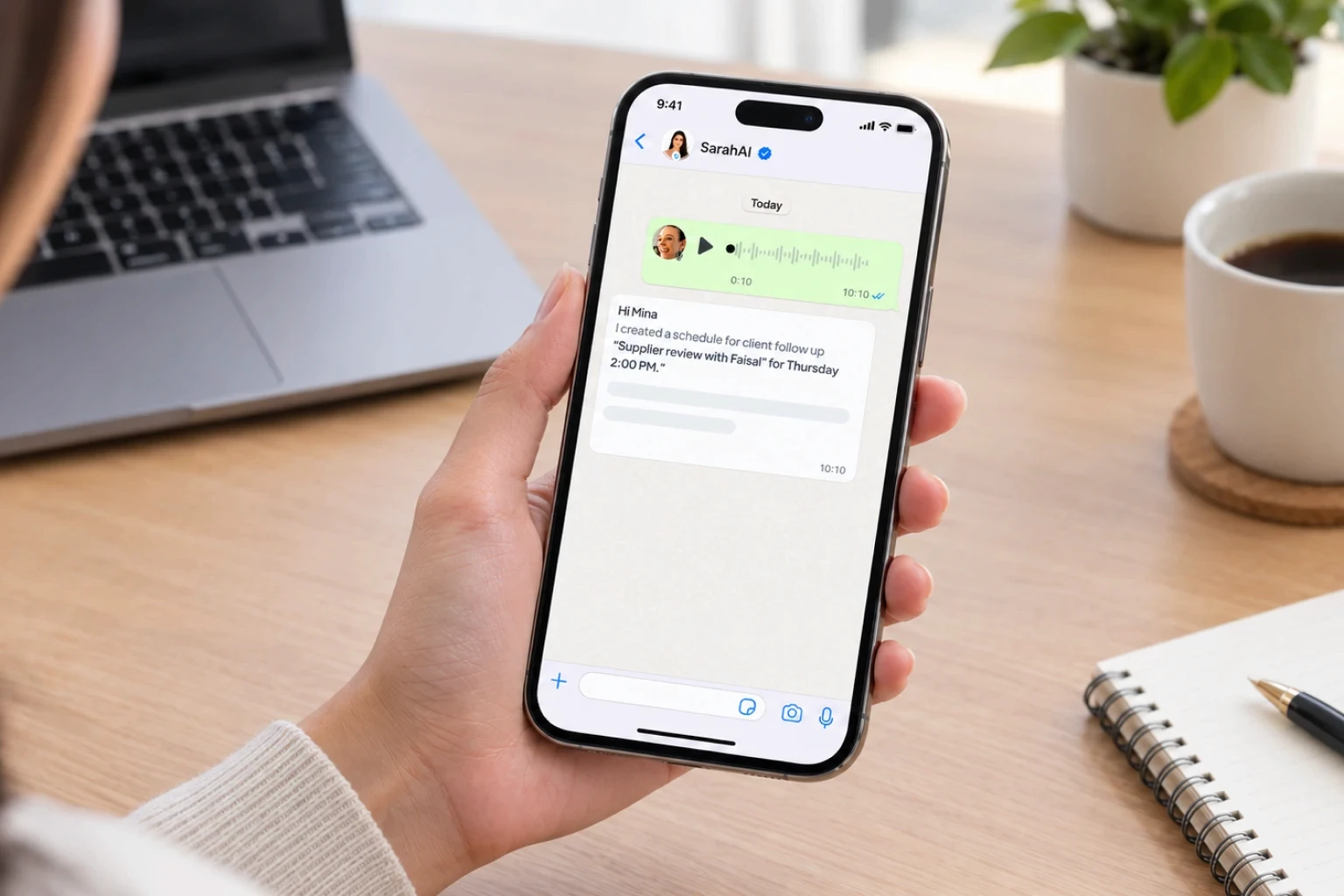
How it handles capture SarahAI works inside WhatsApp, with iOS and Android apps for configuration and in-app voice control. The moment a call ends you send a voice note in any of 100+ languages - "follow up with Priya on the proposal Thursday morning, and remind me to send the revised scope by 5pm today" - and it creates both items with their due dates. It asks when a detail is missing rather than guessing, and confirms what it has created. Because it lives in an app already open on your phone, capture survives the conditions it actually happens in: walking, driving, between meetings. |
How it handles triggers Reminders are delivered on WhatsApp at the scheduled time, as one-off or recurring with flexible patterns - every weekday, every two weeks, last day of the month. Overdue tasks are surfaced rather than waiting to be found. Each morning an intelligent daily brief lists meetings, pending and overdue tasks and priority emails, and a weekly summary lands at the end of the week. Ten minutes before each meeting a WhatsApp alert arrives with Reschedule, Move to Tomorrow and Cancel buttons; five minutes after it ends, a check-in prompts you to log whatever came out of it - which is the exact moment follow-ups are usually lost. |
How it helps with sending On email it summarises unread and priority messages, flags messages from key contacts with real-time WhatsApp alerts, and can draft a reply and send or forward it once you confirm. Nothing goes out without explicit approval, which is the right default for client follow-ups. For team follow-ups, tasks can be delegated to a colleague in their own WhatsApp with no signup required, and you can see what is outstanding across the team. |
Honest limits SarahAI is not a multi-step email sequencer and does not run bulk cadences across a contact list - for Day 2 / Day 5 / Day 12 sequences across many prospects, use your CRM’s sequence tool. It does not join calls or take meeting notes, and it does not search your mailbox beyond unread and priority messages. CRM workflows with Zoho, HubSpot and Pipedrive, plus a sales automation agent and outbound calling for follow-ups, sit in the AI Growth Pro tier, currently in early access via demo. |
Pricing (2026) AI Executive Assistant: $9.99/user/month, annual billing saves 17%. Unlimited tasks, events and reminders, daily and weekly briefs, email summaries and priority alerts, 2 calendar and 2 email integrations, 100 minutes of voice conversation and 100 business or general questions a month. 14-day free trial, no credit card required. |
A Week of Follow-Ups, Running Properly
→ Related read: 10 Best AI CRM Tools for Small Business in 2026
→ Related read: How to Manage Tasks From WhatsApp Without Another App
What You Should Never Automate
Start With Capture, Not Software
The instinct when follow-ups are slipping is to buy a sequencing tool. It feels like the obvious fix, and for businesses running high-volume outbound it often is.
For everyone else it is the wrong end of the problem. A sequencer needs something to sequence, and the follow-ups that cost you money are the ones that never made it into a system to be sequenced - the promise on a call, the supplier question, the introduction you meant to make.
Fix capture first, for one week. Record every commitment the moment it is made, with a date attached, using whatever method survives you being in a hurry. Then look at what the list actually contains.
Most people find the problem was never discipline. It was that nothing was catching the commitments in the eight seconds when they still existed.
More from SarahAI
Frequently Asked Questions
How do you automate client follow-ups without sounding automated?
Automate the trigger, not the message. Use a system to capture the commitment and remind you at the right moment, then write or approve the message yourself. Fully automated sequences are recognisable to clients within about two messages, and the goodwill that costs usually outweighs the time saved. The reliable pattern is automated remembering with human sending.
Why do client follow-ups get missed?
Usually because they were never captured. Around 70% of decisions made in a meeting are forgotten within 24 hours when nobody writes them down, so the follow-up never entered a system that could remind anyone. The second cause is capture without a trigger - it sits in a notes app where nothing will surface it. The third is a single attempt with no cadence behind it.
How many times should you follow up with a client?
For a sales follow-up after a proposal, a practical cadence is four touches across roughly thirty days - day 2, day 5, day 12 and day 30 - with the last being a close-out that stops the sequence. Most people stop after two, which is usually before the client has genuinely had the chance to respond. Delivery chases should be tighter, around day 1, 3 and 5, and escalate to a call.
What is the best way to capture follow-ups after a client call?
Voice, immediately. The moment a call ends is the worst time to open a CRM, because you are walking, driving or already late. A voice note takes about eight seconds and no hands, which means the method survives being used in a hurry. SarahAI captures voice notes on WhatsApp in over 100 languages and turns them into tasks and reminders with due dates.
Can I automate invoice and payment follow-ups?
Yes, and this is the safest type to automate fully for the first two reminders. A polite systematic reminder at the due date and again a week later is expected by most clients and is less awkward than a personal message. Escalate to direct human contact at around 21 days overdue. Most accounting tools including Zoho Books handle the automated portion.
How does SarahAI help automate client follow-ups?
It handles the two stages where follow-up systems usually break: capture and triggering. You send a voice note or message the moment a call ends and it creates tasks with due dates, sets one-time or recurring reminders delivered on WhatsApp, and surfaces overdue items in a daily morning brief. It also sends an alert ten minutes before every meeting and a check-in five minutes after one ends. On email it can draft replies and send them once you confirm.
What follow-ups should never be automated?
Four kinds: re-engaging a client who went quiet for a reason you may not know, anything following bad news or a complaint, follow-ups on significant proposals where the relationship matters more than efficiency, and the final close-out message. The close-out works precisely because it reads as a human decision to stop chasing rather than another step in a sequence.